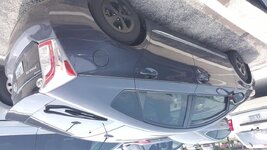
I need to do a test and need your help.
IF you are an IPhone User, please post a picture below...one taken with the phone sideways or in Landscape mode and another with the phone vertical, or Portrait mode and post it to the forum. Also, take two landscape pics - one with the home/control buttons to the right, and one to the Left. Take two Portrait pics, one with home/control buttons on the bottom and one with home/control buttons on top. Can be of anything. Also need to know what version IPhone (4, 5, 6, or 7)
Same if you are a Droid phone user.
It is apparent to me that the IPhone and Droid phones introduce data as part of the image info differently and it causes them to autorotate when posted to the forum. Once I have some 'data' in hand, we may be able to address it properly. In doing some quick searches on VBulletin forum, it is NOT a bug with VBulletin, but rather a unique feature of the Apple/IPhone's image data. It seems you have to pay attention to which way you hold the phone, I hope to prove that out with the above directions.
Thanks for your help!
IF you are an IPhone User, please post a picture below...one taken with the phone sideways or in Landscape mode and another with the phone vertical, or Portrait mode and post it to the forum. Also, take two landscape pics - one with the home/control buttons to the right, and one to the Left. Take two Portrait pics, one with home/control buttons on the bottom and one with home/control buttons on top. Can be of anything. Also need to know what version IPhone (4, 5, 6, or 7)
Same if you are a Droid phone user.
It is apparent to me that the IPhone and Droid phones introduce data as part of the image info differently and it causes them to autorotate when posted to the forum. Once I have some 'data' in hand, we may be able to address it properly. In doing some quick searches on VBulletin forum, it is NOT a bug with VBulletin, but rather a unique feature of the Apple/IPhone's image data. It seems you have to pay attention to which way you hold the phone, I hope to prove that out with the above directions.
Thanks for your help!