

Navigation
Install the app
How to install the app on iOS
Follow along with the video below to see how to install our site as a web app on your home screen.
Note: This feature may not be available in some browsers.
More options
You are using an out of date browser. It may not display this or other websites correctly.
You should upgrade or use an alternative browser.
You should upgrade or use an alternative browser.
image upload test.
- Thread starter GCC
- Start date


Don't be alarmed with this or maybe future posts on a similar subject. We're trying to sort out some upload issues
Paul
Paul




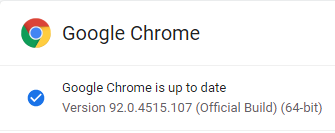
Test upload using Chrome GoogleVersion 92.0.4515.107 (Official Build) (64-bit)


I hope you keep testing Paul, I'm enjoying the pictures!
So you want anyone else to test with the new Chrome version?
So you want anyone else to test with the new Chrome version?


I welcome all to play
two rules!
1) you need to post the name and version of the browser you're using
2) if the image won't upload, you need to put a comment up about the issue you experienced
Rich, what browser?
Others?
two rules!
1) you need to post the name and version of the browser you're using
2) if the image won't upload, you need to put a comment up about the issue you experienced
Rich, what browser?
Others?
To those who can help with this, the issue seems to be based mostly on the Chrome browser and occasionally MS Edge.
The symptoms are you try to upload a picture using either with Image icon or Attachment manager. You select picture but when you click 'upload file', nothing happens.
It would be very helpful to find the versions of Chrome that are causing it
The symptoms are you try to upload a picture using either with Image icon or Attachment manager. You select picture but when you click 'upload file', nothing happens.
It would be very helpful to find the versions of Chrome that are causing it




That was weird. It didn't show the picture when I clicked upload, didn't see it until after I posted.


Google chrome on my phone still works
Google Chrome seems to be working today (didn't work Sunday or Monday).
Google Chrome Version 92.0.4515.131 (Official Build) (64-bit)
(well I posted 32 pics on the Scales/WWTR topic, but now it won't upload 2 pics that I already posted. Chrome SUCKS!)
Google Chrome Version 92.0.4515.131 (Official Build) (64-bit)
(well I posted 32 pics on the Scales/WWTR topic, but now it won't upload 2 pics that I already posted. Chrome SUCKS!)