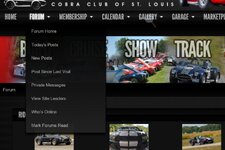
We are still tweaking the forum / website to get the best usable package. We've hit a couple roadblocks on the HomePage/Content side of things and are working on that.
One of the issues is to correct the menuing on the different pages. Ideally, we would have pretty much the same menu at the top on every page - right now it changes from page to page and isn't consistent. With that said, what would you like to see?
The initial thought is to have the menu display:
We all use the forum differently. Are there any links or menu items you'd like to see?
One of the issues is to correct the menuing on the different pages. Ideally, we would have pretty much the same menu at the top on every page - right now it changes from page to page and isn't consistent. With that said, what would you like to see?
The initial thought is to have the menu display:
- Home
- New Posts
- Since last visit
- Last 24 hrs
- Forums
- New Posts
- Private Messages
- who's online
- Gallery
- latest images
- Albums
- Garages
- My Garage
- New Garage
- Membership Info
- Membership Application
- Membership List
- Member benefits
- Edit Profile
- Calendar
- Upcoming Events
- Add Event
- Marketplace (club store)
- Dues
- Store
- How to's
- General
- Cleaning & Detailing
- Exterior
- Interior
- Lighting and Wiring
- Tires & Wheels
- Brakes
- Engine & Powertrain
- Steering & Suspension
- Contact Us
- Contact Page
- Officers
We all use the forum differently. Are there any links or menu items you'd like to see?
Last edited: